Translate

Server Administration লেবেলটি সহ পোস্টগুলি দেখানো হচ্ছে৷ সকল পোস্ট দেখান

বুধবার, ১৯ ফেব্রুয়ারি, ২০১৪

What is OSI Layer? how to work Network Layer?


What is OSI Model Layer?

OSI sort for The Open Systems Interconnect ( OSI ) model has seven layers.
  • Application
  • Presentation
  • Session
  • Transport
  • Network
  • Data Link
  • Physical
Network Layer?

In the seven-layer OSI model of computer networking, the network layer is layer 3. The network layer is responsible for packet forwarding including routing through intermediate routers, whereas the data link layer is responsible for media access control, flow control and error checking and network connectivity.

And Hands This layer provides switching and routing technologies, creating logical paths, known as virtual circuits, for transmitting data from node to node. Routing and forwarding are functions of this layer, as well as addressing, internetworking, error handling, congestion control and packet sequencing.


Illustration of the network layer of the OSI model with examples of common technologies found at that layer.


The network layer controls the operation of the subnet, deciding which physical path the data should take based on network conditions, priority of service, and other factors. It provides: 

  • Routing: routes frames among networks.
  • Subnet traffic control: routers (network layer intermediate systems) can instruct a sending station to "throttle back" its frame transmission when the router's buffer fills up.
  • Frame fragmentation: if it determines that a downstream router's maximum transmission unit (MTU) size is less than the frame size, a router can fragment a frame for transmission and re-assembly at the destination station.
  • Logical-physical address mapping: translates logical addresses, or names, into physical addresses.
  • Subnet usage accounting: has accounting functions to keep track of frames forwarded by subnet intermediate systems, to produce billing information.
See you Structure for network :

Thank you
Asraful.


শনিবার, ১৮ জানুয়ারি, ২০১৪

Exchange Server Requirements and Plan for Exchange Server 2007

Back in December, Gosia Grabowska posted the article on how to install Exchange Server 2007 on Windows Server 2003, which walked you through the steps required for installing Exchange Server 2007 on Windows Server 2003.

In this article, I’ll go into a little more depth and walk you through installing Microsoft Exchange Server 2007 on Windows Server 2008.

Since the RTM (Release to Manufacturing) version of Windows Server 2008 has not been released at the time of this article, the installation covered here was performed on Beta 3 of Windows Server 2008. So beware: the installation may be a bit different on the RTM version.

Another thing I should point out is that the RTM version of Exchange Server 2007 does not support installing to Windows Server 2008.

Since Windows Server 2008 was not ready for development and testing of Exchange Server 2007 before its original release, support for the new operating system was postponed for the release of Exchange Server 2007 Service Pack 1. Exchange Server 2007 SP1, released in September of 2007, does support installing to Windows Server 2008 as planned.

If you’ve purchased the RTM version of Exchange Server 2008, SP1 is available for download at Microsoft TechNet.

Since Exchange Server 2007 SP1 includes all the files necessary for installing Exchange Server 2007 there is no need to perform any slipstreaming with the RTM version. Perhaps the Exchange team released SP1 packaged with all the Exchange 2007 installation files in an attempt to make installing to Windows Server 2008 as simple as to Windows Server 2003

বৃহস্পতিবার, ২৬ ডিসেম্বর, ২০১৩

What is a SIP Server?Available Editions of Brekeke SIP Server.

What is Session Initiation Protocol: 

A Session Initiation Protocol (SIP)  server is the main component of an IP PBX,and mainly deals with the setup of all SIP calls in the network. A SIP server is also referred to as a SIP Proxy or a Registrar.Although the SIP server is the most important part of the SIP based phone system, it only handles call setup and call tear down. It does not actually transmit or receive any audio. This is done by the media server in RTP.

Other hands of Session Initiation Protocol:
SIP Server is a signaling communications protocol, widely used for controlling multimedia communication sessions such as voice and video calls over Internet Protocol (IP) networks.

The protocol defines the messages that are sent between peers which govern establishment, termination and other essential elements of a call. SIP can be used for creating, modifying and terminating sessions consisting of one or several media streams. SIP can be use for two-party (unicast) or multiparty (multicast) sessions. Other SIP applications include video conferencing, streaming multimedia distribution, instant messaging, presence information, file transfer, fax over IP and online games.
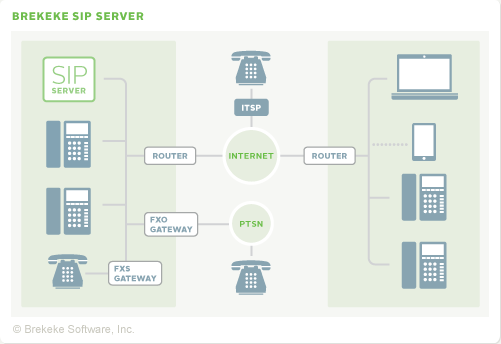
Brekeke SIP Server - Network Diagram


Available Editions of Brekeke SIP Server
EDITION
USAGE
PRICE
Standard
Edition
  • SIP Trunk Services
  • Integration in smaller SIP communication systems
  • R&D, Product Demonstration
$500 USD
Advanced
Edition
  • Telephony Carrier
  • Service/System that requires high availability (Redundancy)
  • Service/System that has higher security requirements (TLS support)

 
$1,500 USD


Academic
Edition
Usage by faculty, students or staff at degree-granting academic institutions
Free


Evaluation
Edition


To evaluate Brekeke SIP Server Standard Edition

  Thank you
Asraful islam
Free (60-Day)


সোমবার, ১১ নভেম্বর, ২০১৩

What is RAID and Clacification of RAID0,RAID1, RAID5 ,RAID6, RAID10, RAID50, RAID60.

What is RAID ?RAID is stand for Redundant Array of Independent Disks. RAID is now used as an umbrella term for computer data storage schemes that can divide and replicate data among multiple hard disk drives. RAID's various designs all involve two key design goals: increased data reliability or increased input/output performance. When multiple physical disks are set up to use RAID technology, they are said to be in a RAID array. This array distributes data across multiple disks, but the array is seen by the computer user and operating system as one single disk. RAID can be set up to serve several different purposes.


Using Multiple Hard Drives for Performance and Reliability

or others for RAID
RAID is a solution that was developed originally for the network server market as a means of creating large storage at a lower cost. Essentially, it would take multiple lower cost hard drives and put them together through a controller to provide a single larger capacity drive. This is what RAID stands for: redundant array of inexpensive drives or disks. To achieve this, specialized software and controllers were needed to manage the data being split between the various drives. Eventually the processing power of your standard computer system allowed the features to filter their way into the personal computer market.

Now a RAID storage can be used for three distinct purposes. These include capacity, security and performance. Capacity is a simple one that is typically involved in most every type of RAID setup used. For instance, two hard drives can be linked together as a single drive to the operating system effectively making a virtual drive that is twice the capacity. Performance is another key reason for using a RAID setup on a personal computer. In the same example of two drives being used as a single drive, the controller can split a data chunk into two parts and then put each of those parts on a separate drive. This effectively doubles the performance of writing or reading the data on the storage system. Finally, RAID can be used for data security. This is done by by using some of the space on the drives to essentially clone the data that is written to both drives. Once again, with two drives we can make it so that the data is written to both drives. Thus, if one drive fails, the other still has the data.


Typical Apps  RAID 0
Data striping without redundancy . Highest performance No data protection; One drive fails, all data is lost
High End Workstations, Data Logging, Real-Time Rendering, Transitory Data

 RAID 1
Single Drive Failure
Disk mirroring, Very high performance; Very high data protection; Very good on write performance
High redundancy cost overhead; Because all data is duplicated, twice the storage capacity is required
Operating Systems, Transactional Databases

 RAID 5
Single Drive Failure , Block-level data striping with distributed parity
Best cost/performance for transaction-oriented networks, Very high performance, very high data protection; Supports multiple simultaneous reads and writes, Can also be optimized for large, sequential requests
Write performance is slower than RAID 0 or RAID 1
Data Warehousing, Web, Archiving, Basic File Servers, Disk Backup

 RAID 6
2 Drive Failure
Same as RAID 5 with x2 Parity distributed across an extra drive
Offers Solid Performance with the additional fault tolerance of allowing availability to data if 2 disks in a RAID group to fail. Recommended to use more drives in RAID group to make up for performance and disk utilization hits compared to RAID 5
Must use a minimum of 5 drives with 2 of them used for parity so disk utilization is not as high as RAID 3/5. Performance is slightly lower than RAID 5
High Availability Solutions, Mission Critical Apps, Servers with Large Capacity Requirements

 RAID 10
1 Disk Per Mirrored Stripe (not same mirror)
Combination of RAID 0 (data striping) and RAID 1 (mirroring)
Highest performance, highest data protection (can tolerate multiple drive failures)
High redundancy cost overhead; Because all data is duplicated, twice the storage capacity is required; Requires minimum of four drives
Databases, Application Servers

RAID 50
1 Disk Per Mirrored Stripe
Combination of RAID 0 (data striping) and RAID 5 (Single Parity Drive)
Highest performance, highest data protection (can tolerate multiple drive failures)
High redundancy cost overhead; Because all data is duplicated, twice the storage capacity is required; Requires minimum of four drives
Databases, File Servers, Application Servers,

 RAID 60
2 Disks Per Mirrored Stripe
Combination of RAID 0 (data striping) and RAID 6 (Dual Parity Drives)
Highest performance, highest data protection (can tolerate multiple drive failures)
High redundancy cost overhead; Because all data is duplicated, twice the storage capacity is required; Requires minimum of four drives


Root Extension of  RAID Disk Drive:
High Availability Solutions, Mission Critical Apps, Servers with Large Capacity Requirements


I've discussed the various pros and cons of each of the levels of RAID that can be used on personal computers but there is another issue that many people don't realize when it comes to creating RAID drive setups. Before a RAID setup can be used, it first must be constructed either by the hardware controller software or within the software of the operating system. This essentially initializes the special formatting required to properly track how the data will be written and read on the drive.

This probably doesn't sound like a problem but it is if you even need to change how you want your RAID array configured. For instance, say you are running low on data and want to add an extra drive for either a RAID 0 or RAID 5 array. In most cases, you won't be able to without first reconfiguring the RAID array which will also remove any of the data that was stored in those drives. This means that you have to fully back up your data, add the new drive, reconfigure the drive array format that drive array and then restore your original data back to the drive. That can be an extremely painful process. As a result, make sure you really have the array setup up the way you want to the first time you do it.


শনিবার, ৯ নভেম্বর, ২০১৩

What is Mail Server ?

The backbone of the mail system is the Mail Transport Agent (MTA). It will handle receiving mail addressed directly to your machine, sending it to the correct users mail box, and sending mail out from the machine. I determined Postfix to be the best choice for my MTA and after some reading found Procmail for sorting mail, SpamBayes for detecting spam, and Fetchmail for grabbing mail from my pop mailboxes

. A mail server usually consists of a storage area where where e-mail is stored for local users, a set of user definable rules which determine how the mail server should react to the destination of a specific message, a database of user accounts that the mail server recognizes and will deal with locally, and communications modules which are the components that actually handle the transfer of messages to and from other mail servers and email clients. 

What is a Mail Server?

With the click of a mouse button, you can send an email from one point of the globe to another in a matter of seconds. Most of us take this process for granted, giving little thought to how it actually works. It's easy to understand how standard snail-mail gets from point A to point B - but how does an email message make its way from a sender to a recipient? The answer to that question revolves around something called a mail server. You can learn more about the role that mail serves play in email delivery by reading on below.

What is a Mail Server?

A mail server is the computerized equivalent of your friendly neighborhood mailman. Every email that is sent passes through a series of mail servers along its way to its intended recipient. Although it may seem like a message is sent instantly - zipping from one PC to another in the blink of an eye - the reality is that a complex series of transfers takes place. Without this series of mail servers, you would only be able to send emails to people whose email address domains matched your own - i.e., you could only send messages from one example.com account to another example.com account.


রবিবার, ২৭ অক্টোবর, ২০১৩

Proxy Server Configuration


What is Proxy Server?

A proxy server is a specific type of application server that routes HTTP requests to content servers that perform the work. Proxy servers can be classified according to the role that it plays in a system. This specific proxy server is classified as a reverse proxy server because the main function is to act as the first point of contact, not including the firewall, for client requests into enterprise server.

Overview of the proxy server
   

Fore browser Proxy setup instructions:

You are Configure step by step :

  • Mozilla Firefox: Tools > Options > Advanced > Settings > Manual proxy configuration.
  • Google Chrome: Options > Under the hood > Network > Change proxy settings > LAN settings > Use a proxy server > Advanced > HTTP.
  • Internet Explorer: Tools > Internet options > Connections > LAN settings > Use a proxy server > Advanced > HTTP.
  • Opera: Tools > Preferences > Advanced > Network.

Anonymity levels

  • Level 1: No anonymity; remote host knows your IP and knows you are using proxy.
  • Level 4: Low anonymity; remote host does not know your IP, but it knows you are using proxy.
  • Level 8: Medium anonymity; remote host knows you are using proxy, and thinks it knows your IP, but this is not yours (this is usually a multihomed proxy which shows its inbound interface as REMOTE_ADDR for a target host).
  • Level 16: High anonymity; remote host does not know your IP and has no direct proof of proxy usage (proxy-connection family header strings). If such hosts do not send additional header strings it may be considered as high-anonymous. If a high-anonymous proxy supports keep-alive you can consider it to be extremely-anonymous. However, such a host is highly possible to be a honey-pot.

Planet Lab / CoDeeN

PlanetLab proxy servers marked with a icon are from the Planetlab CoDeeN (CDN) Project, a network of educational Internet nodes at Princeton University. These proxies may force a captcha and allocate you a different IP address as advertised.

Security notes

Our proxy list database consists of third-party 'open proxies'; proxy servers set up for public use. We have absolutely NO control over any of these proxy servers and can not vouch for security, therefore USE OUR DATABASE AT YOUR OWN RISK. For a guaranteed secured encrypted connection, private servers in our control, reliable fast speeds and multiple servers world-wide we recommend you use our VPN service.

Other system in Internet Explorer 6.0 v Browser :

  1. On the Tools menu in Internet Explorer, click Internet Options, click the Connections tab, and then click LAN Settings.
  2. Under Proxy server, click to select the Use a proxy server for your LAN check box.
  3. In the Address box, type the IP address of the proxy server.
  4. In the Port box, type the port number that is used by the proxy server for client connections (by default, 8080).
  5. You can click to select the Bypass proxy server for local addresses check box if you do not want the proxy server computer to be used when you connect to a computer on the local network (this may speed up performance).
  6. Click OK to close the LAN Settings dialog box.
  7. Click OK again to close the Internet Options dialog box.

Browser Internet Explorer 5v

  1. Click Start, point to Settings, click Control Panel, and then double-click Internet.
  2. Click the Connections tab, click LAN Settings, and then click to select the Use Proxy Server check box.
  3. In the Address box, type the appropriate proxy server information, and use the following format:
    http://<address>
  4. Click Advanced, and then type the appropriate proxy settings in the Servers area. Use the following syntax for the proxy settings:
    http://<address>:<port>
    where <address> is the Web address of the proxy server, and <port> is the port number that is assigned to the proxy server. For example, if the proxy server's address is "proxy.example.microsoft.com" and the port number is 80, the setting in the Proxy Server box should appear like this:
    http://proxy.example.microsoft.com:80
    Important: If you use a backslash (\) instead of a slash (/) in the proxy server's address, the settings disappear from the Proxy Server box and Internet Explorer does not find the proxy server.

    If you are using the Internet Protocol (IP) address of your proxy server, make sure not to type leading zeros. For example, use 130.25.0.1 instead of 130.025.000.001.

    If you do not know the Web address or port number of the proxy server, contact your network administrator. Also, if there are any Web servers on the local network for which you want to bypass the proxy, type the appropriate host names in the Don't Use Proxy For These Addresses box. For example, if you do not want to use the proxy server to obtain access to the "example.com" Web server on your LAN, type example.com in the Don't Use Proxy For These Addresses box.

Internet Explorer 4.0, 4.01 for Windows 95 and Windows NT

  1. Click Start, point to Settings, click Control Panel, and then double-click Internet.
  2. Click the Connection tab, and then click to select the Access the Internet using a proxy server check box.
  3. Click Advanced, and then type the appropriate proxy settings in the Servers area. Use the following syntax for the proxy settings
    http://<address>:<port>
    where <address> is the Web address of the proxy server, and <port> is the port number that is assigned to the proxy server. For example, if the proxy server's address is "proxy.example.microsoft.com" and the port number is 80, the setting in the Proxy Server box should look like this:
    http://proxy.example.microsoft.com:80
    Important: If you use a backslash (\) instead of a slash (/) in the proxy server's address, the settings disappear from the Proxy Server box and Internet Explorer does not find the proxy server.

    If you are using the Internet Protocol (IP) address of your proxy server, make sure that you do not type leading zeros. For example, use 130.25.0.1 instead of 130.025.000.001.

    If you do not know the Web address or port number of the proxy server, contact your network administrator. Also, if there are any Web servers on the local network for which you want to bypass the proxy, type the appropriate host names in the Don't Use Proxy For These Addresses box. For example, if you do not want to use the proxy server to access the "example.com" Web server on your LAN, type example.com in the Don't Use Proxy For These Addresses box.


More Information Subtopics  for Proxy server

  1. Creating a proxy server
  2. Creating a proxy server cluster
  3. Modifying a proxy server cluster
  4. Migrating profiles for the proxy server
  5. Disabling routing to applications
  6. Routing requests to ODC-compliant application servers in other cells
  7. Configuring rules to route requests to Web servers
  8. Modifying the HTTP endpoints that the proxy server listens on
  9. Adding a new HTTP endpoint for the proxy server
  10. Setting up caching in the proxy server
  11. Routing requests from a plug-in to a proxy server
  12. Creating a proxy server cluster using the wsadmin command
  13. Monitoring the proxy server with PMI
  14. Monitoring traffic through the proxy server
  15. Overview of the custom error page policy
  16. Request mapping
  17. Session failover in the proxy server
  18. Installing a Session Initiation Protocol proxy server
  19. Troubleshooting the proxy server
  20. Session Initiation Protocol overload protection
  21. Configuring SIP quorum support using the default core
If you see video player for  Proxy Server Configure than click this link:
http://www.youtube.com/watch?v=ns_aXvOvq0o

Popular Posts

show

click here